
As you become more confident in using Marketo, you will eventually be asked to create a method for a Lead to select multiple webinars (or assets) at once. This is a variation of the Recurring Webinar series and is an important method to learn because it can be applied to at least three use cases that will help you scale your Marketo programs quickly.
This post will focus on the workflow component only. There may be some additional work to do on Guided Landing Pages to make this fully functional.
Use Cases
- Multiple Webinars, One Choice (Recurring Webinar)
- Multiple Assets, Multiple Choices
- Lead Assignment Rules
What You Need
The Concept is your central Operational Flow will handle the initial Form Fill. That Form Processor will call a local Smart Campaign at the individual Webinar level to initiate the next steps, such as Confirmation Email.
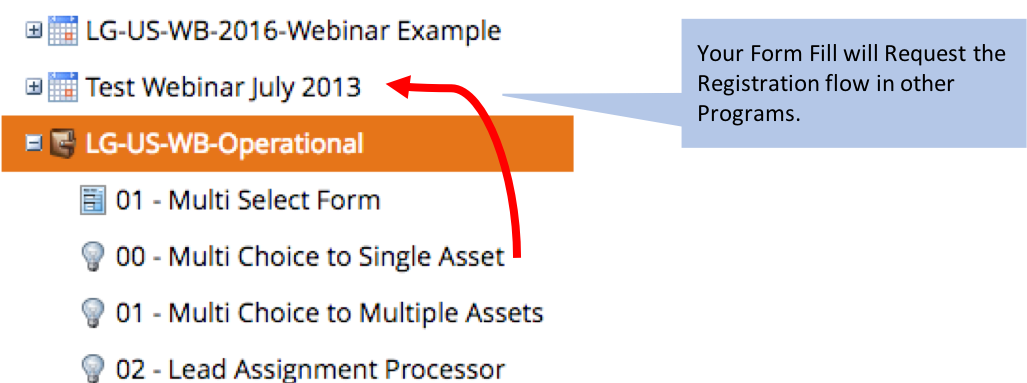
Form Setup
- Usual Stuff
- Request Campaign Code – string field, hidden as shown below.
- Script to concatenate values.
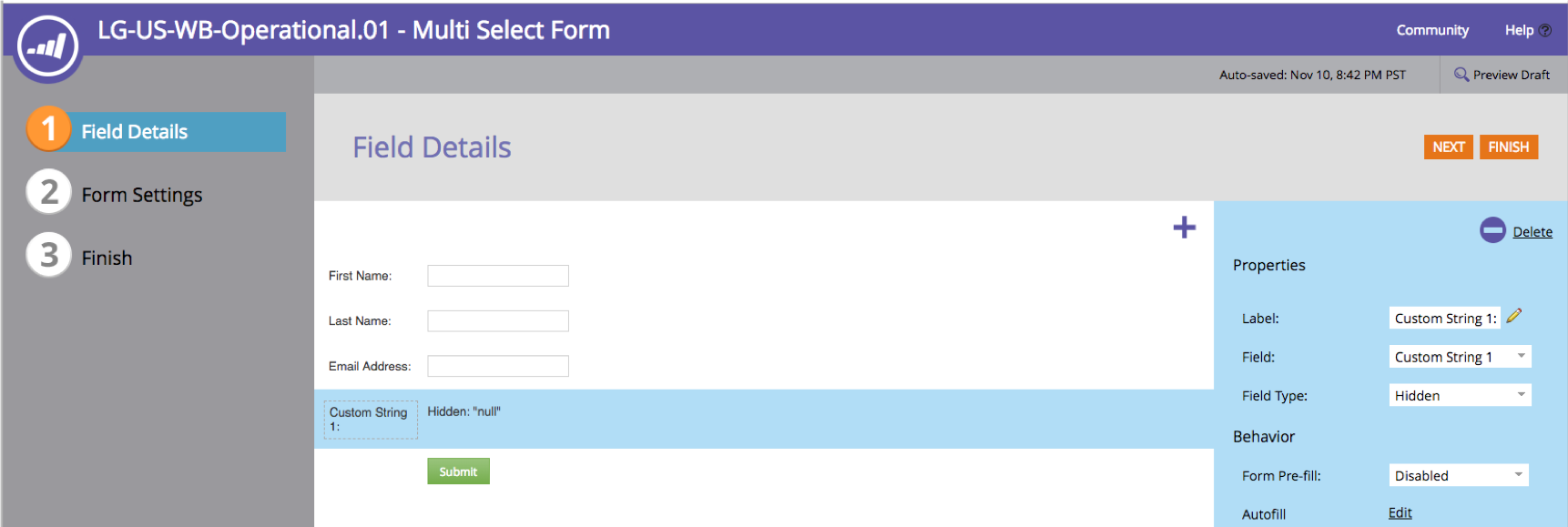
The Code should populate your hidden field based on the values from a script, a URL parameter, or other method. If you have Multiple Webinars with different dates, but the Lead may only select One Date, use the Recurring Webinar method. You won’t need a hidden field for that one.
Guided Landing Page (not shown)
- Tiles or Multi select box that tie a specific asset or webinar to the Form hidden field “Request Campaign Code”. This field is a String type and expect it to be overwritten each time.
- Script to concatenate values if multiple assets selected. (Sorry, try GitHub or the Nation for ideas).
Multiple Assets, Single Choice
Use this if you have several times for a Webinar and the Lead chooses only one time. Also a good variation for a recurring webinar. Remember, you may not need a Hidden Field in this situation. Depends.
Trigger: Fills Out Form on Web Page X
Flow:
- Request Campaign Field [Code]
- If Request Campaign Code=X1, then Request Campaign X1
- Change Data Value: Request Campaign Code=NULL

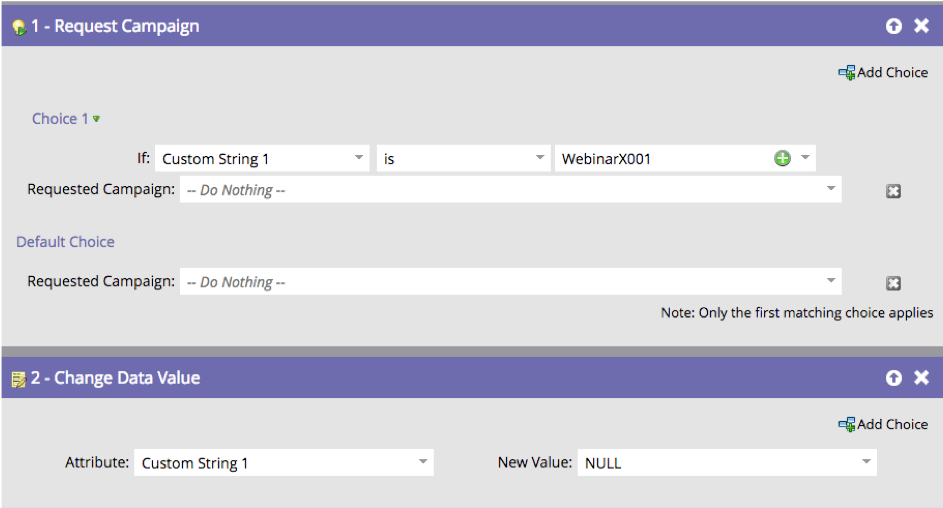
In the standard Recurring Webinar setup, you can set someone’s Program Status to trigger the Confirmation Email and data transfer. In this version, you can use this for any type of asset registration because it is only pointing at the Registration Flow inside each Program.
You may not really need Step 2 because it will be overwritten anyway. It’s a good habit to clean up fields if there could be confusion later. There is also a small risk that someone could fill out several forms within a few minutes and you would erase their value before another campaign finished processing.
Multiple Choices, Multiple Selections
Use this method when you actually have one or more webinars someone could register for at the same time. This could be for live webinars or on-demand webinars, allowing a lead to binge content easily.
Trigger: Fills Out Form on Page Y
Request Campaign Field has concatenated values in the Form. In that case, you must use CONTAINS instead of IS. Your Page may also need Javascript to ensure the values are properly added to the hidden field.
Flow:
- Request Campaign Field [Code]
- If Request Campaign Code=X1, then Request Campaign X1
- Request Campaign Field [Code]
- If Request Campaign Code CONTAINS X2, then Request Campaign X2
- Request Campaign Field [Code]
- If Request Campaign Code=X3, then Request Campaign X3
- Request Campaign Field [Code]
- If Request Campaign Code=X4, then Request Campaign X4
- Etc…
- FINAL STEP
- Change Data Value: Request Campaign Code=NULL
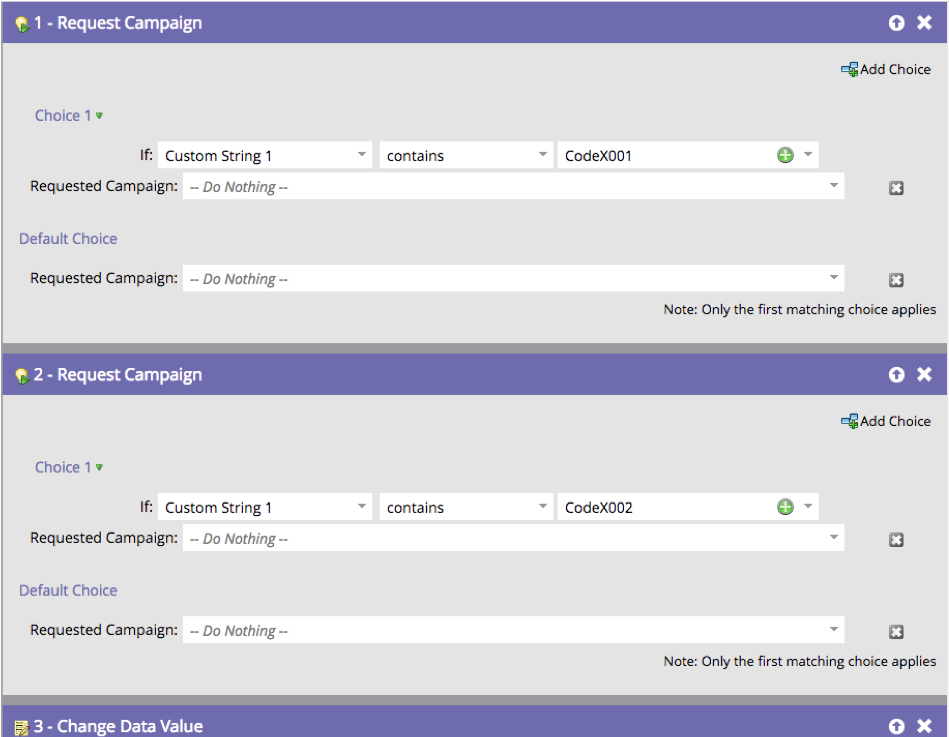
Things to know:
- The more asset codes to process, the longer it will take.
- Small risk that someone would fill out the Form twice or go to another page that uses the same Field and overwrite their values before it processed.
- Maintenance is important! As you add or remove assets, be sure to update the Smart Campaign with the latest information, especially to remove unused Webinars so it runs faster.