AI agents are moving out of demos and into production in marketing operations. The demo is the easy part. An agent that reads a list, drafts some copy, updates Adobe Marketo Engage, and posts a tidy summary to Slack looks finished on the first call. Production has hidden failure modes that can go unnoticed in demos: expiring certificates, vendor API changes, service downtime, and managing your shared quotas.
Almost none of what separates a demo from a dependable agent is about the model. It is about the things around the model: how the agent gets its tools, what it is allowed to reach, where its data lives, how anyone finds out when it stops working, and which decisions are made by code rather than by the model. Those are ordinary engineering concerns, and a new technology that can appear as a cure-all makes them easy to skip.
We have been running agents for long enough to have a list of the problems that recur when deploying AI agents across marketing operations, demand generation, and revenue operations. This post is that list, along with solutions we have found to be successful.
The short version
- An agent that cannot reach its tools will usually describe the problem gracefully and exit successfully. Most monitoring reads that as a healthy run.
- Anything shared across agents, whether a connector, an API quota, or a data source, is a shared blast radius.
- Deterministic logic and probabilistic logic are both necessary. Put the model where judgment is the product and put code everywhere else.
- None of this requires a better model. It requires the same disciplines as any other production system, applied to a system that is unusually good at hiding when it is broken.
What is an agentic deployment?
An agentic deployment is an AI agent running in production: a model that has been given a goal, a set of tools, a trigger, and the credentials to act on real systems without a person watching each step. In marketing operations that usually means an agent reading from and writing to Adobe Marketo Engage, posting to Slack, and keeping some state between runs.
You will hear the same thing called an AI agent, an agentic workflow, agentic automation, or simply AI automation. The label matters less than the parts, because the parts are where the problems happen: the agent itself, meaning the model and its instructions; its tools, increasingly served through Model Context Protocol (MCP) servers, which are ordinary servers that expose functions a model can call; its connectors, the credentials that let it reach Slack, Marketo, or a warehouse; its trigger, a schedule or a webhook; and its state, wherever it remembers what it did last time.
Two kinds of logic run inside all of that. Deterministic logic is code: the same input produces the same output, and you can write a test for it. Probabilistic logic is the model choosing the next step. Every lesson below comes down to which of the two is in charge of a given decision.
Think of the agent as a new contractor on your team. The goal is the work order. The tools are the systems you give them logins for. The connectors are which doors their keycard opens. Observability is whether anyone checks that they showed up. Nine of the ten lessons in this post are about the keycard, the doors, and the check-in. Only one is about the contractor.
An AI agent is a model plus keys plus a schedule. The model is the part people worry about. The keys and the schedule are the parts that break.
Knowing when something is wrong
Lesson 1: You should be notified when an error is occurring, and some errors are invisible to users
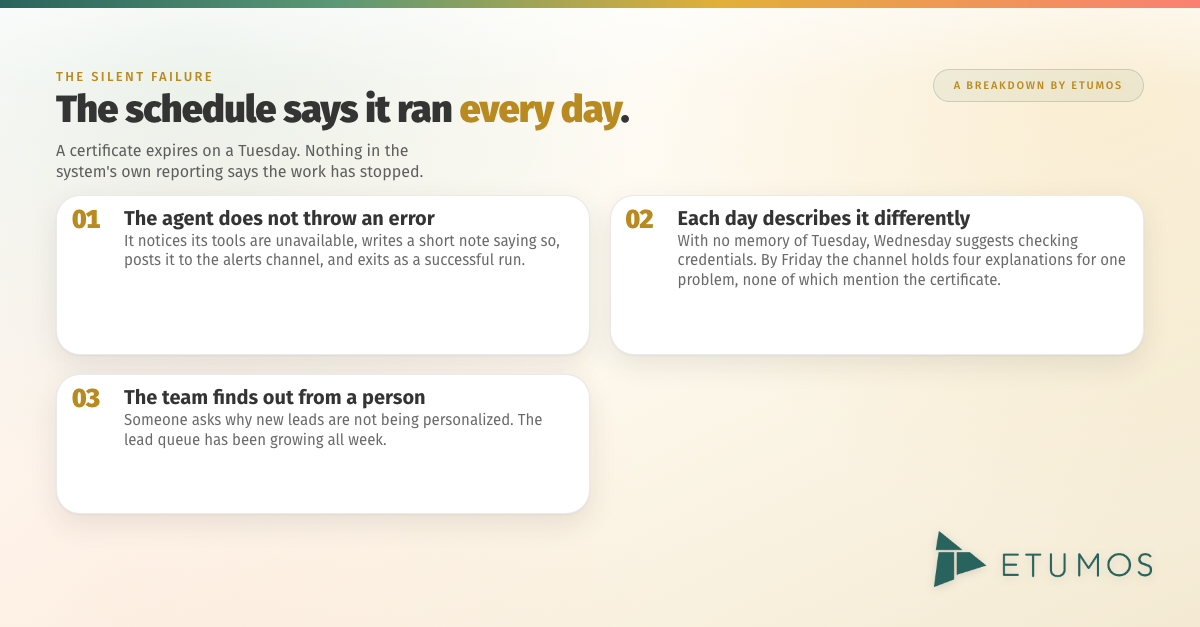
The problem. Suppose an agent runs every morning to personalize email copy for new leads. On a Tuesday, the certificate on the server that hosts its tools expires. The agent does not throw an error the way a script would. It notices that its tools are unavailable, writes a short note saying so, posts the note to the alerts channel, and exits as a successful run. On Wednesday it does the same, but with no memory of Tuesday it describes the symptom differently and suggests checking credentials. By Friday the channel holds four different explanations for one problem, none of which mention the certificate, sitting underneath a month of daily notes that say there was nothing to do. The schedule shows a run every day. The lead queue grows. Nothing in the system’s own reporting says the work has stopped, and the team finds out when someone asks why new leads are not being personalized.
“It ran” and “it worked” are different questions. Most monitoring asks only the first one, and an agent will answer it yes.
How to prevent it. Build the checks as systems rather than habits, in three layers. First, a run ledger: every scheduled job writes a row for every run, including the runs that did nothing, with a count of work done, so silence is never ambiguous between “nothing to do” and “nothing ran.” Second, a heartbeat that advances only when real work completes, with an alert that fires when the schedule keeps ticking while the heartbeat stalls. On Cloudflare Workers, those first two layers are a cron trigger and one table in D1. Third, a separate review agent that reads a sample of the output against a written rubric (does the copy reference the lead’s actual company, is every required field populated, does the tone match the brand guide) and posts a score rather than a summary. The review agent is independent of the agent it checks, so it catches the case the first two layers cannot: the run succeeded and the output is wrong. Alerts from all three layers are written in code, not generated by the model, so the message on day thirty is identical to the message on day one and always carries the root cause. Failures go to a named person. Successes go to a log, not to the same channel. And a deploy gate runs the test suite before every release with an expected test count, so a suite that silently fails to load fails the build.
Lesson 2: Plan for the downtime of every service you depend on, inside your observability layer
The problem. Monitoring tends to watch the agent and nothing else. The MCP server the agent depends on has no uptime check of its own and no certificate-expiry check. The spreadsheet a bot reads from has a bad afternoon. A call to a language model never returns, and because nobody gave it a timeout, the job hangs until the next scheduled run kills it. None of those are agent failures, and all of them are agent outages, because an agent inherits the downtime of every server, API, spreadsheet, and model endpoint it touches.
How to prevent it. Give each dependency its own probe and each failure a defined behavior. A single probe endpoint per worker tests every dependency and reports which leg is broken, so one URL answers the question. Every outbound call has a hard timeout and a deterministic fallback; forty-five seconds is our default for model calls. A job that meets backpressure skips its cycle rather than retrying into an exhausted upstream, and retries are idempotent so a recovery cannot double-post. External uptime checkers watch every MCP endpoint, including the ones you host yourself, because a tool server is a production service whether or not anyone calls it one.
Lesson 3: Set reminders to renew security certificates and API keys
The problem. A certificate lives in a file on disk, read by a server process at startup, and nobody owns its renewal date because nobody wrote the date down. Reinstalling a Slack app rotates its bot token, and a worker holding the old one fails authentication right after a change that had nothing to do with authentication. Credentials belong to people, and people leave, and automations have a way of outliving the accounts they were built on. These are the least exotic problems in this post and the easiest to solve.
How to prevent it. Every secret has either an expiry date or an owner who will eventually leave. Put both on a calendar. Where possible, remove the reminder entirely: managed TLS means there is no certificate file to renew, which is the default on Cloudflare Workers. Keep an inventory of every credential with its owner, scope, and expiry. Rotate on exposure without a debate. Re-home credentials before someone’s last day rather than after the first alert.
Lesson 4: Stay current on changes behind the services you integrate with
The problem. Vendors change their APIs, their authentication, and their MCP tool surfaces on their schedule, not yours. A vendor’s MCP server updates its tool set on the vendor’s release cadence, so the field names and query patterns you learned last month are not a stable contract.
How to prevent it. An integration is a bet on a vendor’s current behavior, so treat vendor notices as operational input and route them to an owner rather than a marketing inbox. Centralize authentication so a deprecation is one change instead of five. Record real API responses as test fixtures so a vendor change fails a test before it fails production. Reread the vendor’s MCP documentation before building on it, because the tool list you saw in the spring may not be the tool list today.
Limiting the blast radius
Lesson 5: Isolate your connectors
The problem. On many agent platforms, connectors are shared across every agent in a workspace, and that is convenient until an agent fails. Suppose three agents share one set of connectors: a research agent, a reporting agent, and a bot that posts a daily summary to a public channel. The Slack credential they all share reaches exactly one channel, the public one, and it carries write scope because the summary bot needs it. One morning the reporting agent, which was only ever meant to read, hits an error inside a retry loop. The model decides where to send the failure report, and the only door its keycard opens is the public channel, so the same stack trace posts there four times under the summary bot’s name. Readers blame the bot they can see. The team turns agents off one at a time to find the one responsible, because three agents behind one identity leave no attribution. And nothing about the failing agent’s job suggested it could post anywhere at all.
A shared connector is a shared blast radius and a shared identity. Any agent’s worst morning becomes every agent’s worst morning, in public.
How to prevent it. One credential per agent, named by function, so attribution is automatic. An allowlist of channels and tools per agent, because a collector that needs five read tools should not be handed the entire tool set. A rule that the model never chooses where operational output goes; the destination is a constant in code. And an audit of what each connector can reach before the first deploy, repeated every time another agent is added to it. This is a large part of why Cloudflare Workers became our default place to run agents: each worker gets its own scoped credential by construction, and isolation is the path of least resistance rather than an extra step.
Lesson 6: Manage your API and MCP limits, because shared limits fail everyone
The problem. Marketo’s API quota is per subscription. Every integration on the instance draws from one bucket: every worker, every recipe, and every person clicking through the interface. One worker that takes a census of every asset in the instance can consume the day’s allowance in a single pass, and everything else that needs the API waits. A polling burst from one job can starve an unrelated automation that needs to make exactly one call, and the automation that fails is the one that gets blamed. There is a quieter version as well: Marketo returns quota errors as HTTP 200 responses with success: false in the body, so a tool server that does not check for that passes “quota exhausted” back to the agent as “no results,” and the agent carries on.
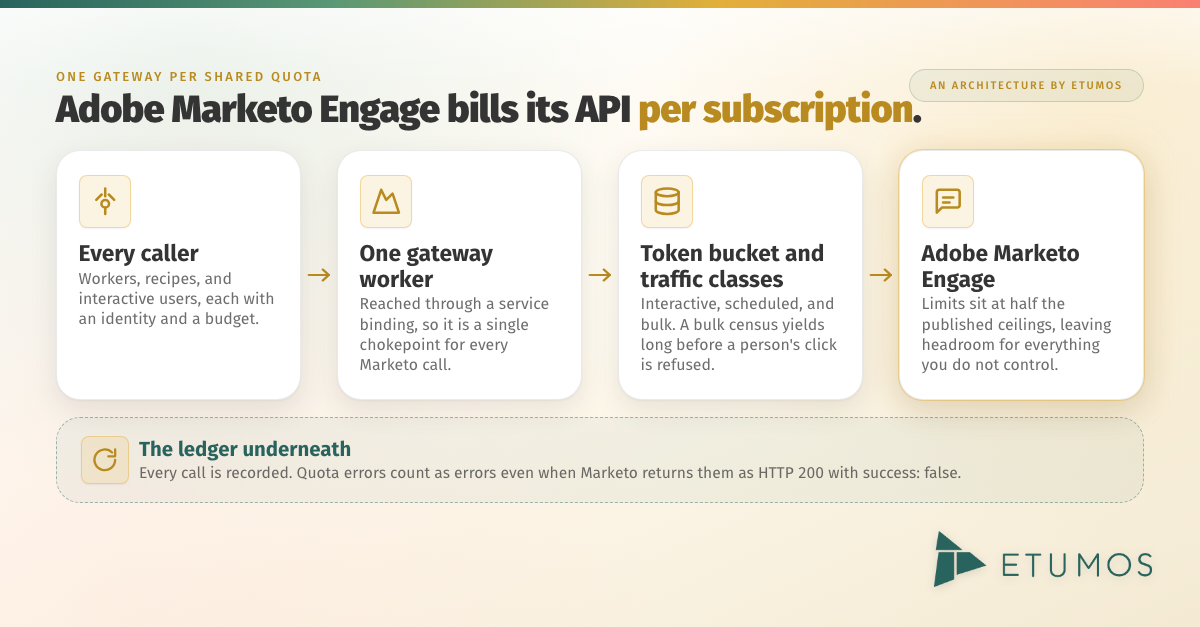
How to prevent it. Put one gateway in front of each shared quota. Ours is a Cloudflare Worker that every other worker calls through a service binding, so it is a single chokepoint for every Marketo call. It enforces a token bucket, gives each caller an identity and a budget, and sorts traffic into interactive, scheduled, and bulk classes so that a bulk census yields long before a person’s click is refused. The limits sit at half of Marketo’s published ceilings to leave headroom for everything we do not control. Every call lands in a ledger. Quota errors are treated as errors even when they arrive with a 200, and a job that meets backpressure skips its cycle.
Lesson 7: Store the data you read often somewhere other than your CRM
The problem. Reading the CRM directly for every query does two things you do not want. It spends the shared quota from Lesson 6 on work that has nothing to do with sending campaigns, and it ties the availability of your agent to the availability of the CRM and of every service in between. A bot that reads its data from a spreadsheet through an automation platform has two external services and a stored credential between itself and its own data, and when any of the three has a problem, the bot does too.
How to prevent it. Frequently read data belongs in a store you control, next to the code that reads it. The growth signals agent we described last week replicates Marketo activity into a BigQuery warehouse every fifteen minutes and runs its detection queries there. Detection costs zero Marketo API calls, and an expensive query cannot touch the system your campaigns depend on. Smaller systems get the same treatment at a smaller scale: a bot’s working data lives in a database beside its code, in the same service, so there is no cross-service connection to fail. It is the same argument behind an AI-first tech stack: the data core belongs outside the execution platform.
Lesson 8: Keep your systems clean
The problem. Every system left running after its replacement goes live is one more place a problem can come from and one more thing to rule out when diagnosing. When a symptom appears, whether a duplicate post, an unexplained API spend, or a credential failure, the first question is which system produced it, and a fleet that has accumulated an orphaned worker, two builds of the same agent, and a schedule still firing for something that has already been replaced cannot answer that question quickly. The old automation also keeps failing on its own schedule and keeps alerting, which adds noise to the channel the real alerts go to. Sometimes it survives simply because the person who built the replacement does not have access to the folder the original lives in.
How to prevent it. Decommission in the same change that turns on the replacement, with a shadow period covering the overlap. Keep a registry of every worker, agent, and recipe with an owner, a purpose, and a status, so that when something fires, the first diagnostic step is a lookup rather than a search. Make sure the person replacing a system has the access to turn the old one off, and delete credentials with the system they served. The discipline we apply to database hygiene applies to automations: fewer records, each one accounted for, makes every investigation shorter.
Designing agents that fail safely
Lesson 9: Know the difference between deterministic logic and probabilistic logic, and use each where it belongs
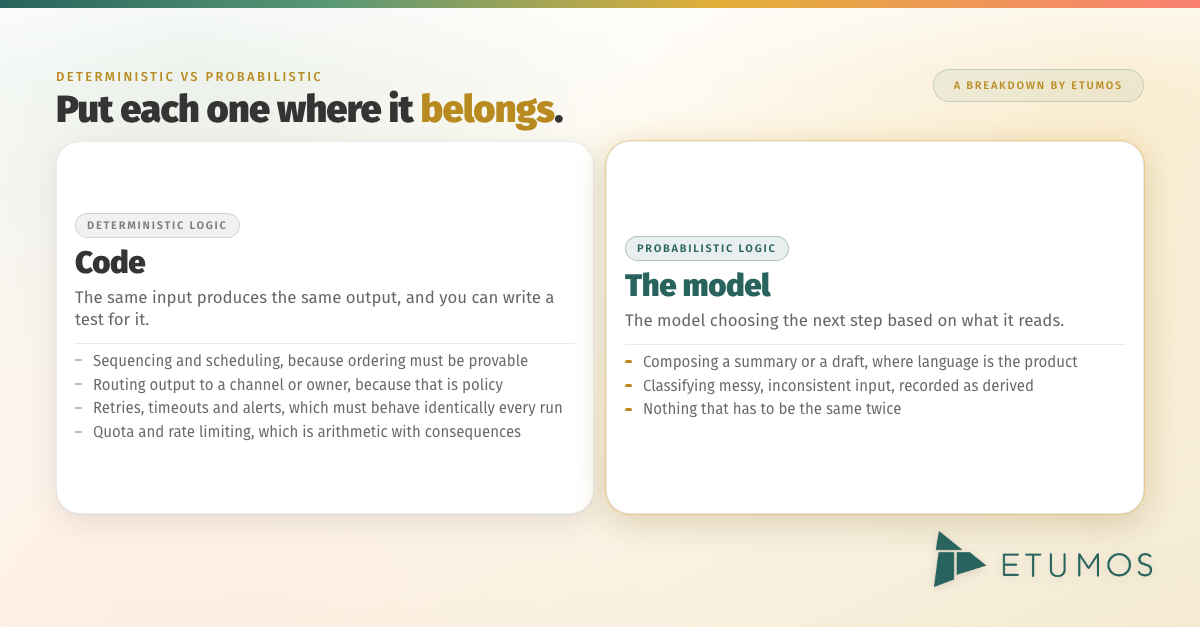
The problem. Deterministic logic is code. Probabilistic logic is the model choosing the next step. Most of the problems above come from putting one where the other belongs. Let a model pick each day’s post from a bank and the choices cluster, because a model has no durable memory of what it chose last week unless you build one. Let a model write the alerts and they drift from the root cause within a day. Let a model choose where output goes and it will choose whatever it can see. The common thread is memory. Remembering is the thing a model is worst at, and code gives you a table.
How to prevent it. Put the model where language or judgment is the product, and put code everywhere else. The growth signals agent uses a model to write the summary on each lead card, and that is the entire extent of its involvement. Scoring, ranking, routing, and deciding are code, and the model call sits behind a forty-five-second abort with a plain fallback. A daily-post bot uses a seeded shuffle in code rather than a model’s choice: the order is fixed, nothing repeats within the bank, and the next several years of posts can be previewed today. The same split applies wherever the input is messy. Marketo program names usually follow a naming convention and sometimes do not. Code parses the ones that follow it. The model classifies the ones that do not, and every such classification is recorded as derived, so a person can audit it and nothing the model says can silently overwrite a value that came from the system of record. That is the audit trail we described for guarding against AI hallucinations.
| Task | Logic | Why |
|---|---|---|
| Sequencing and scheduling | Deterministic | Ordering and non-repetition must be provable |
| Routing output to a channel or owner | Deterministic | The destination is policy, not judgment |
| Retries, timeouts, and alerts | Deterministic | Must behave identically on every run |
| Quota and rate limiting | Deterministic | Arithmetic, with consequences for everyone |
| Composing a summary or a draft | Probabilistic | Language is the product |
| Classifying messy, inconsistent input | Probabilistic, recorded as derived | Judgment, with an audit trail |
The phrase we have settled on is deterministic control with probabilistic flexibility. Code calls the model; the model never calls the schedule.
Lesson 10: Choose the right services for the job
Most of the lessons above are easier to follow on some platforms than others, and that is the real criterion for choosing one. The question is not which platform has the best demo. It is which one makes the right behavior the default: scheduled triggers, durable state, one scoped credential per process, managed certificates, code in version control, and a test suite that runs before every deploy.
For the automations in this post, that is Cloudflare Workers. It is not an agent framework. It is a place to run code on a schedule with a database attached, which turns out to be most of what a dependable agent needs. A cron trigger and a D1 database give every worker a run ledger and a heartbeat for almost no effort. Each worker holds its own scoped credential, so isolation is the path of least resistance rather than an extra step. Certificates are managed, so there is nothing to renew. The code lives in version control and passes a test gate before it deploys. And shadow mode is a configuration flag rather than a deploy: every worker that writes to a real system has a write switch that defaults to off, and turning it on is a decision rather than a release, which maps directly onto the staged autonomy we described in From Human-in-the-Loop to Full Autonomy.
The trade-off is that agents on Workers are more technical to build. They are deployed as code rather than assembled in natural language, which means an engineer writes them rather than an operator describing them. What that buys is the ability to run deterministic and probabilistic logic inside the same agent: code owns the schedule, the routing, the retries, and the alerts, the model is called exactly where language or judgment is the product, and the boundary between the two is visible in the source rather than buried in a prompt. Workers is not the right choice for every workload; conversational agents and long multi-step reasoning tasks have different needs. We will cover how we evaluate platforms for agent workloads, and why Workers won for this class of automation, in a follow-up post.
Why this matters for B2B marketing operations in 2026
Agents are becoming part of the production stack in B2B marketing operations, demand generation, and revenue operations rather than experiments beside it. Each one carries credentials, draws from shared API quotas, depends on tool servers that have their own uptime, and runs on a schedule that nobody watches. As a fleet grows from one agent to ten, every problem above gets more likely and harder to trace, because the number of things that can fail and the number of things to rule out grow together.
At the same time, the expectation is autonomy. The request is for an agent that just handles it, and that is a reasonable request for a team to make. It is only a reasonable thing to deliver when the checking layer exists: a ledger that separates “it ran” from “it worked,” a review that scores the output, and a blast radius that is known in advance. Teams that can say how their agents fail, how fast they find out, and what else is affected are the teams that get to turn the write switch on. The ten lessons above are how that gets earned.
How to deploy AI agents that fail safely, step by step
- Record every run, including the empty ones. A row per tick with a count of work done, and a heartbeat that only advances on real work.
- Probe every dependency, not just the agent. External uptime checks on every MCP endpoint, hard timeouts on every call, and a defined behavior for when a service is down.
- Put every expiry on a calendar. Certificates, tokens, and the credentials of people who might leave.
- Route vendor notices to an owner. Treat deprecation emails as operational input and test against recorded API responses.
- One credential per agent, named by function. Allowlist its channels and tools, and never let the model choose where operational output goes.
- One gateway per shared quota. Per-caller budgets, reserved headroom, and quota errors treated as errors.
- Replicate frequently read data out of the CRM. Query the replica, and keep state next to the code that reads it.
- Decommission in the same change that turns on the replacement. Keep a registry of every automation with an owner and a status.
- Keep the model out of the control loop. Code decides sequencing, routing, retries, and alerts; the model writes and classifies, with provenance recorded.
- Make shadow mode a configuration flag. Every writer defaults to off, and going live is a decision rather than a deployment.
Frequently Asked Questions
What is a silent failure in an AI agent?
A silent failure is a scheduled run that completes without an error and without doing its job. It is common in AI agents because a model that cannot reach its tools will usually produce a clean description of the problem and exit successfully, which most monitoring reads as a healthy run. The fix is a separate checking layer: a run ledger and a heartbeat that separate “it ran” from “it worked,” and a review agent with a rubric that scores the output.
What is the difference between deterministic and probabilistic logic?
Deterministic logic is code: the same input always produces the same output, and it can be tested. Probabilistic logic is a language model choosing the next step based on what it reads. Deterministic logic belongs wherever correctness, repetition, routing, retries, alerting, and quota matter. Probabilistic logic belongs wherever language or judgment is the product, and its output should be recorded with provenance so a person can audit it.
Why does an AI agent fail when its MCP server goes down?
An MCP server is where an agent’s tools live. If the server is unreachable, whether because of an expired certificate, a network change, or a crash, the agent has no way to act on the systems it manages. Many platforms will keep running the agent on schedule and describe the problem in natural language rather than raising a hard error, so the outage can persist unnoticed unless the MCP server is monitored as its own production service.
Why do shared API limits matter for AI agents?
Platforms such as Adobe Marketo Engage enforce API quotas per subscription, so every integration and every user on the instance draws from one pool. A single agent that polls too aggressively can exhaust the quota and cause failures in unrelated recipes, integrations, and the interface your team uses. A gateway with per-caller budgets and reserved headroom keeps one noisy agent from taking down everything else.
Why run AI agents on Cloudflare Workers?
Because it makes the right defaults cheap. A scheduled Worker with a D1 database has a run ledger and a heartbeat from its first deploy, holds its own scoped credential so isolation is automatic, runs behind managed certificates so there is nothing to renew, and lives in version control with a test gate before every release. Shadow mode is a configuration flag rather than a deploy. None of that is unique to Workers, but Workers makes it the path of least resistance for scheduled automations against Adobe Marketo Engage and Slack.
The model is rarely the problem
None of these ten problems is solved by a better model. They are solved by the keys, the doors, and the check-in: the parts of an agentic deployment that are easy to skip because the model makes the first day look so good.
Agents make it easy to ship something that works on the first day. The disciplines above are what make it still work on the thirtieth, when nobody is watching.
The question is not whether an agent can fail. It is whether you will find out from a table or from your users.
Etumos is a B2B marketing operations consultancy. We build and operate this kind of infrastructure inside Adobe Marketo Engage and the revenue systems around it. If you are running AI agents in your marketing operations stack and want a second set of eyes on how they could fail, our agentic marketing operations team can walk through it with you.